
After building this site, I figured connecting a custom domain would be a nice touch — both as a long-term motivator (nothing keeps you accountable like paying for something every year) and as a foundation for a personal branding ecosystem where I can later attach subdomains to side projects.
I'd handled domain purchases and DNS configuration before at work, so the technical side wasn't intimidating. The harder question was which registrar to use.
After some research, I narrowed it down to three candidates: GoDaddy, Gabia (a popular Korean registrar), and Cloudflare.
Comparing Domain Registrars
Here's how the three services stack up:
| Feature | GoDaddy | Gabia | Cloudflare |
|---|---|---|---|
| Pricing | Discounted first year, 2–3× on renewal | Reasonable, relatively stable | At-cost (zero margin), same on renewal |
| WHOIS Privacy* | Paid add-on (~$10/yr) | Paid add-on | Free, included |
| Language support | English-first | Korean UI | English-first |
| Upselling* | Aggressive (hosting, email, SSL, etc.) | Moderate | None |
| SSL certificate | Sold separately | Sold separately | Universal SSL free (edge-level) |
| CDN / DDoS | Paid add-on | Limited | Free (5 Tbps network) |
| DNS management* | Own DNS or external nameservers | Own DNS or external nameservers | Cloudflare DNS only (locked) |
| API automation* | API available (limited) | Limited | Full REST API + Terraform provider |
| Vercel integration* | Manual DNS entry required | Manual DNS entry required | Auto-resolve on conflict |
| Nameserver portability* | Supported | Supported | Not supported (Cloudflare NS fixed) |
The items marked with * deserve a closer look.
WHOIS Privacy controls whether your personal information — name, email, address, phone number — is publicly visible in the WHOIS database. Anyone can run whois hijero.me and see registrant details, making you a target for spam and marketing outreach. GoDaddy and Gabia sell a "WHOIS Privacy Protection" add-on for ~$10/year. Cloudflare includes it for free on every domain.
Upselling refers to the practice of pushing additional products during checkout — think "Would you also like web hosting? A business email? An SSL cert?" GoDaddy is notorious for this: you have to click "No thanks" multiple times just to get to your domain. Gabia is less aggressive but not immune. Cloudflare's registrar business model is built around growing its user base, not upselling add-ons, so there's none of it.
DNS management is about which server controls your domain's DNS records. GoDaddy and Gabia both offer their own DNS and let you freely switch to external providers like Cloudflare or Route 53. Cloudflare's registrar, however, locks your domain to Cloudflare's own nameservers (ns1.cloudflare.com) the moment you purchase — you can't move them elsewhere. That sounds like a constraint, but Cloudflare DNS is among the fastest in the world, so in practice it rarely matters.
API automation means being able to add or update DNS records and domain settings through code. GoDaddy has an API but with limited functionality. Gabia's API support is even more restricted. Cloudflare offers a complete REST API and an official Terraform provider, making Infrastructure as Code fully viable. Not a priority today, but a real advantage if the site ever needs automation at scale.
Vercel integration is about how convenient it is to connect your domain to a Vercel project. With GoDaddy and Gabia, you add the A and CNAME records Vercel requires manually through each registrar's DNS interface. Cloudflare is also manual by default, but when a record conflict is detected, Vercel surfaces an "Authorize DNS records from Vercel" modal that can resolve it automatically. More on this below.
Nameserver portability means whether you can migrate DNS management to a different provider later. Cloudflare locks you in; GoDaddy and Gabia let you switch freely. If this is a dealbreaker, one option is to buy the domain from GoDaddy or Gabia and then migrate only the DNS to Cloudflare.
One more note on SSL: Cloudflare provides Universal SSL for free. Traffic routed through the Cloudflare proxy is automatically protected with HTTPS between the user and Cloudflare's edge. That said, when you're hosting on Vercel, this advantage is less significant — Vercel automatically provisions Let's Encrypt certificates for your custom domain. Either way, HTTPS works fine with all three registrars when combined with Vercel.
Conclusion: Cloudflare
After weighing all of the above, I went with Cloudflare. The deciding factors:
.medomain at $16.56/yr, same price on renewal (GoDaddy hikes significantly at renewal)- WHOIS privacy free (GoDaddy and Gabia charge extra)
- CDN + DDoS protection included by default — no added cost as traffic grows
- Automatic DNS conflict resolution with Vercel
- Opens the door to Cloudflare Workers, R2, and the broader Cloudflare ecosystem down the road
The nameserver lock-in is a real constraint, but for a Vercel-hosted site, this combination felt like the most natural and cost-effective choice.
Buying a Domain on Cloudflare
First things first: sign up for a Cloudflare personal account and log in to the dashboard.
Navigating to the Domains page
The Domains tab is empty on a fresh account.
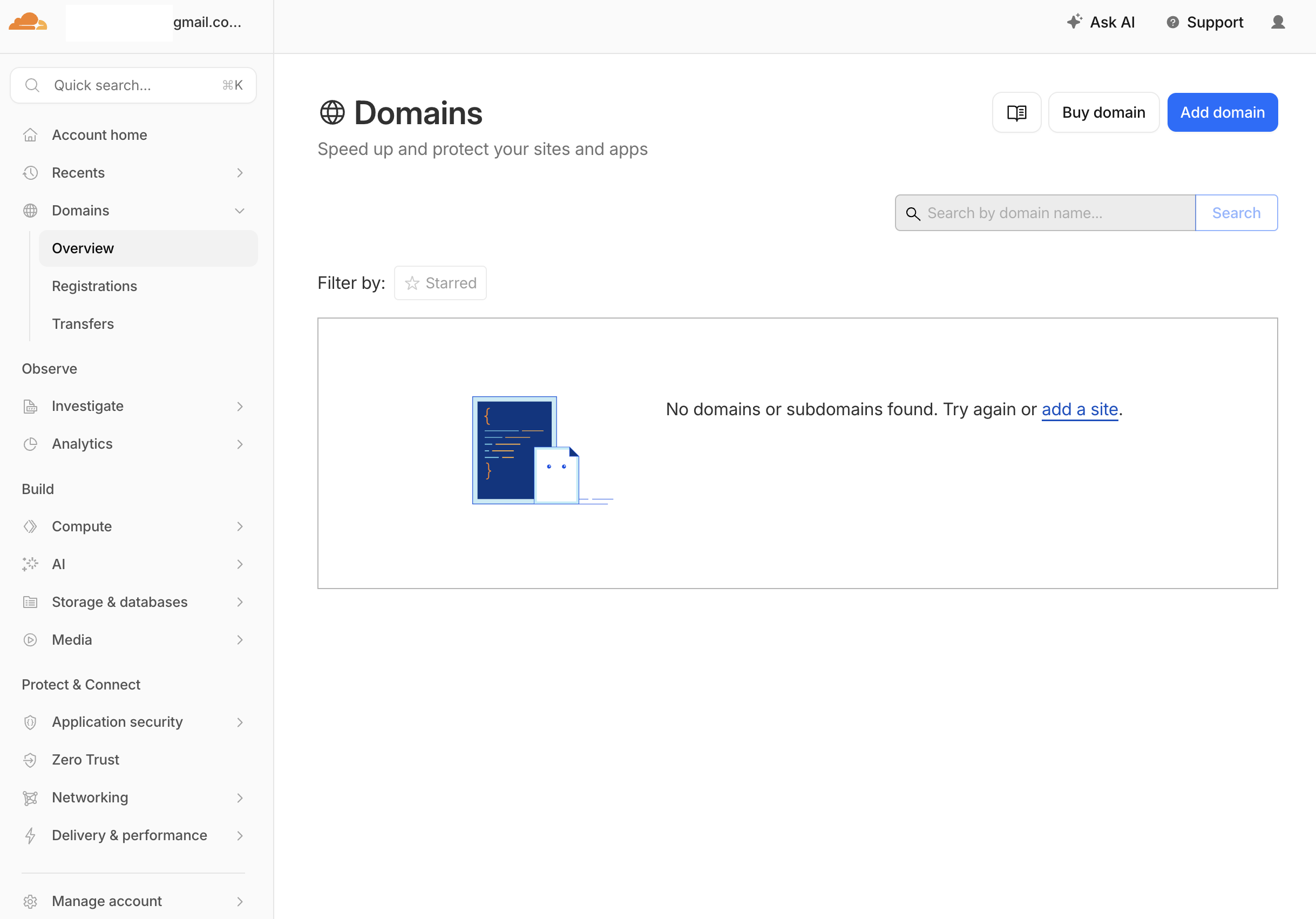
Click "Add domain" to start the purchase flow.
Searching for and selecting a domain
Search for the domain you want — if it's available, Cloudflare shows the price. In my case, hijero.me came up at $16.56. A list of alternative domains and prices appears below.
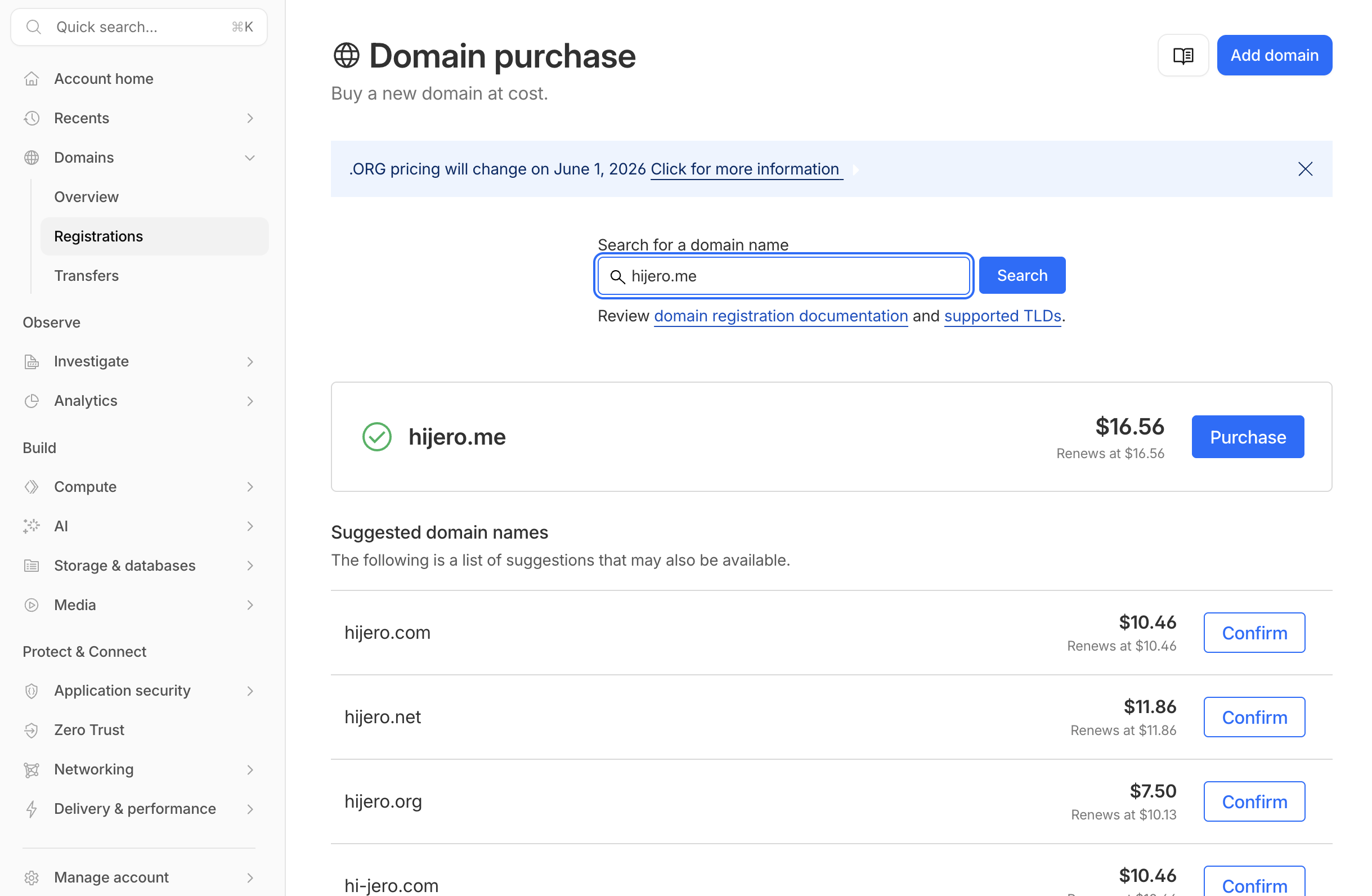
.com and .org options were cheaper, but I wanted to weave my name "Jerome" naturally into the domain, so .me was the obvious pick.
Entering registration details and checking out
Confirm the one-year plan, fill in your address and payment details, and complete the purchase.
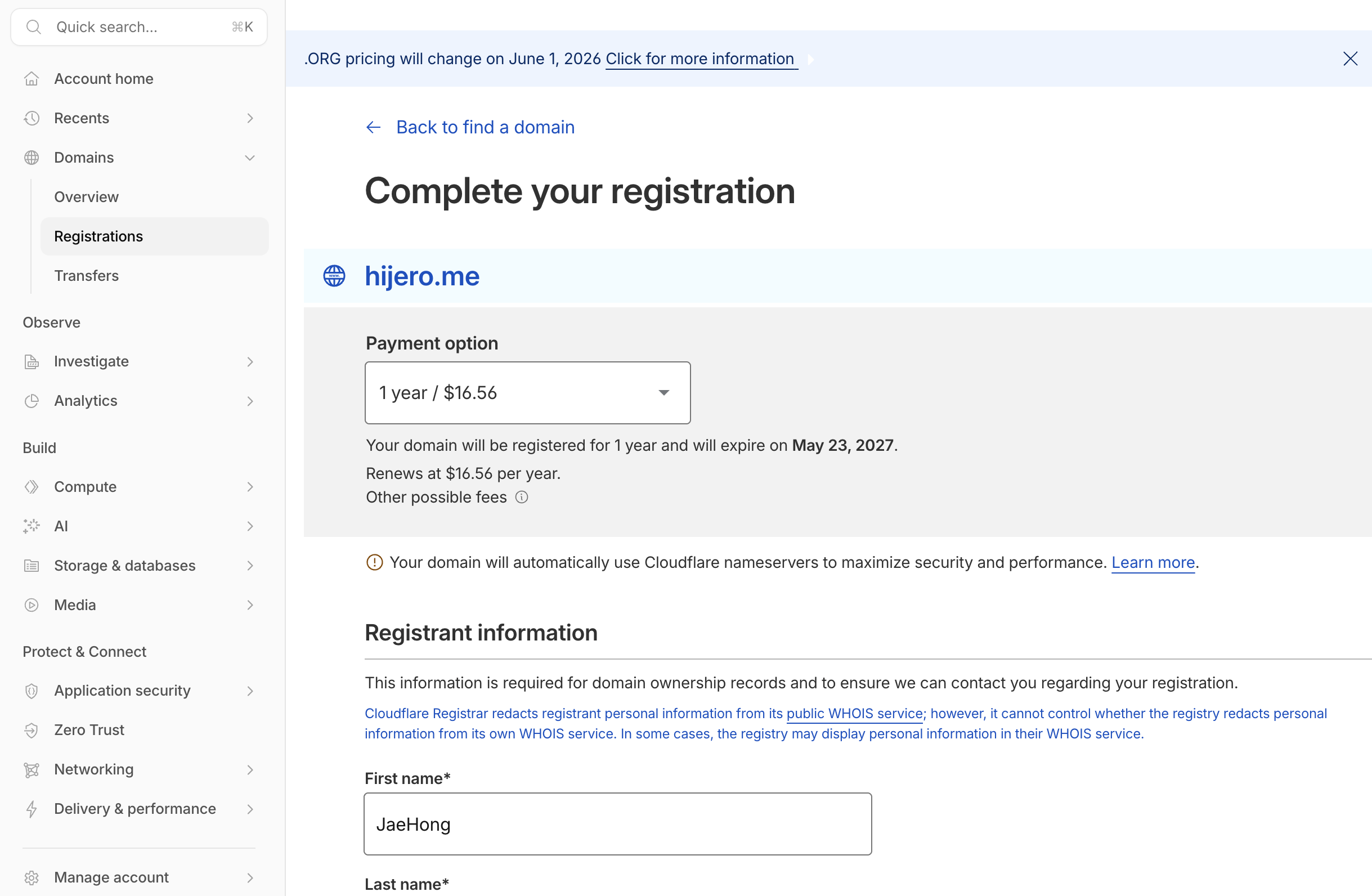
My expiry date is May 23, 2027. Thanks to Cloudflare's at-cost pricing, the renewal will be the exact same amount.
Purchase complete
That's it. Straightforward.
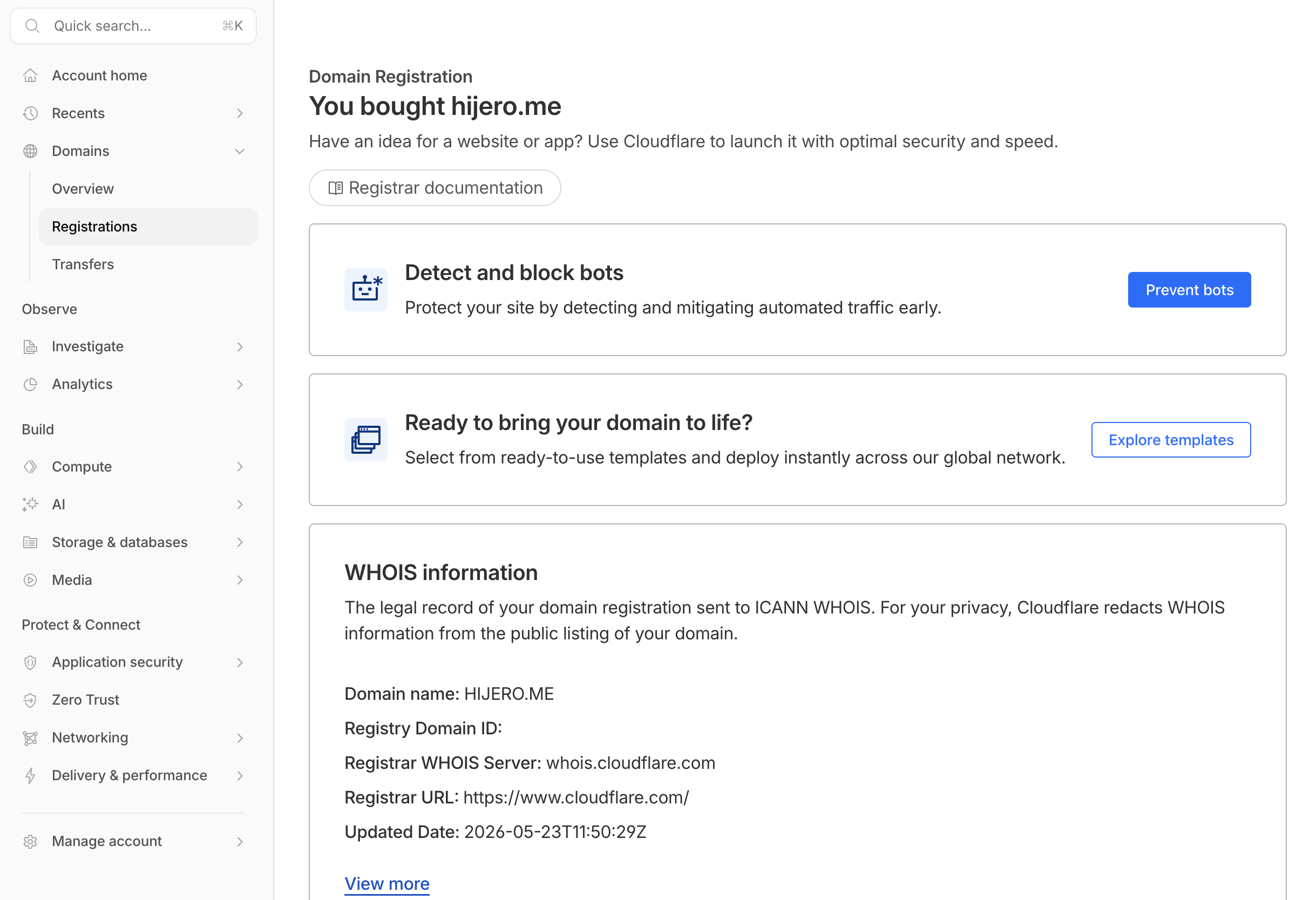
The WHOIS section at the bottom confirms Cloudflare as the registrar. Nameservers are automatically set to Cloudflare the moment the purchase goes through.
Connecting the Domain to Vercel
Domain purchased — time to wire it up.
DNS state right after purchase
The DNS tab in Cloudflare is blank. No records yet.
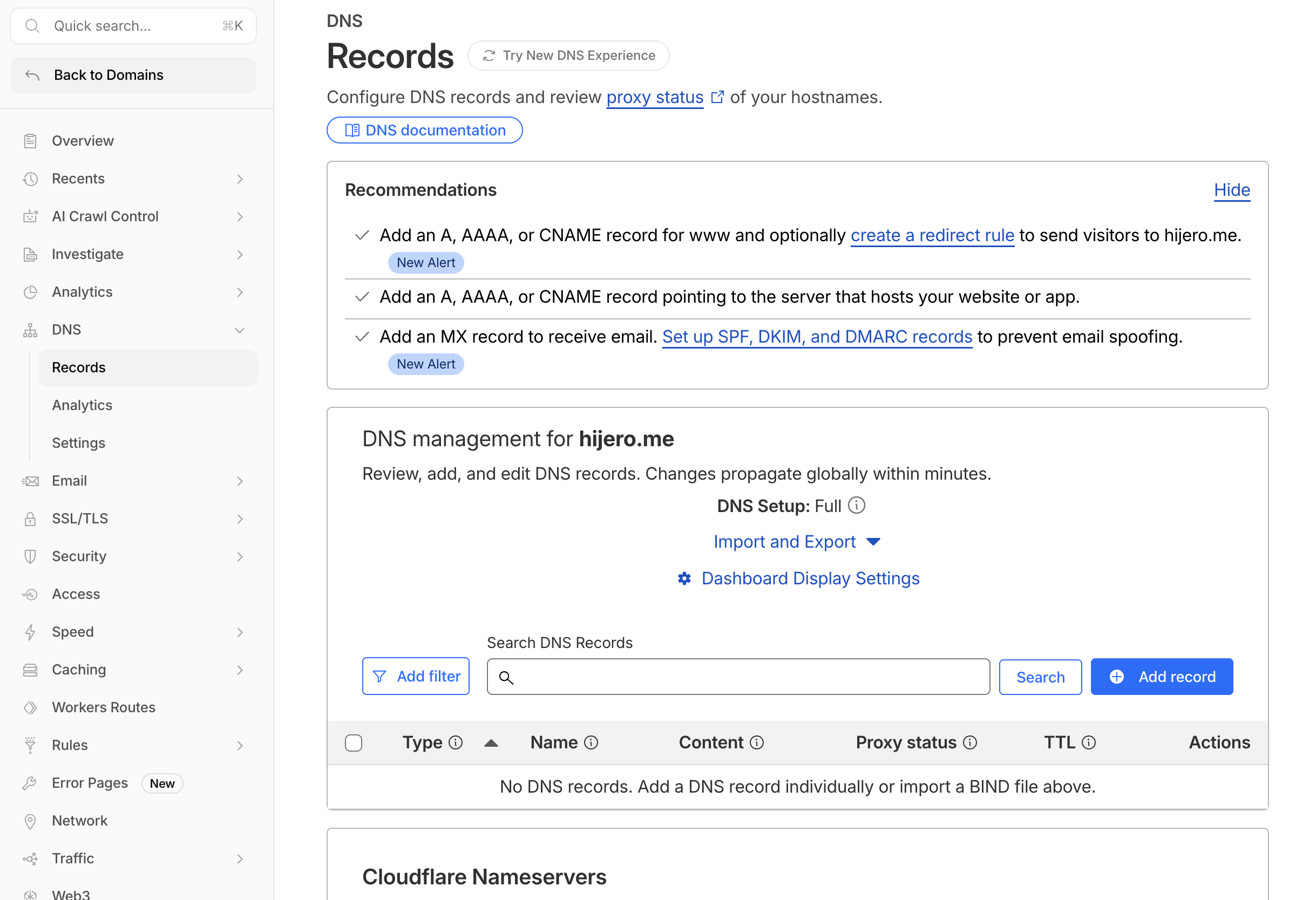
The + Add record button is where you'll add the records Vercel requires.
Checking which DNS records Vercel needs
In your Vercel project, go to Settings → Domains and add hijero.me. Vercel will tell you exactly which records to add.
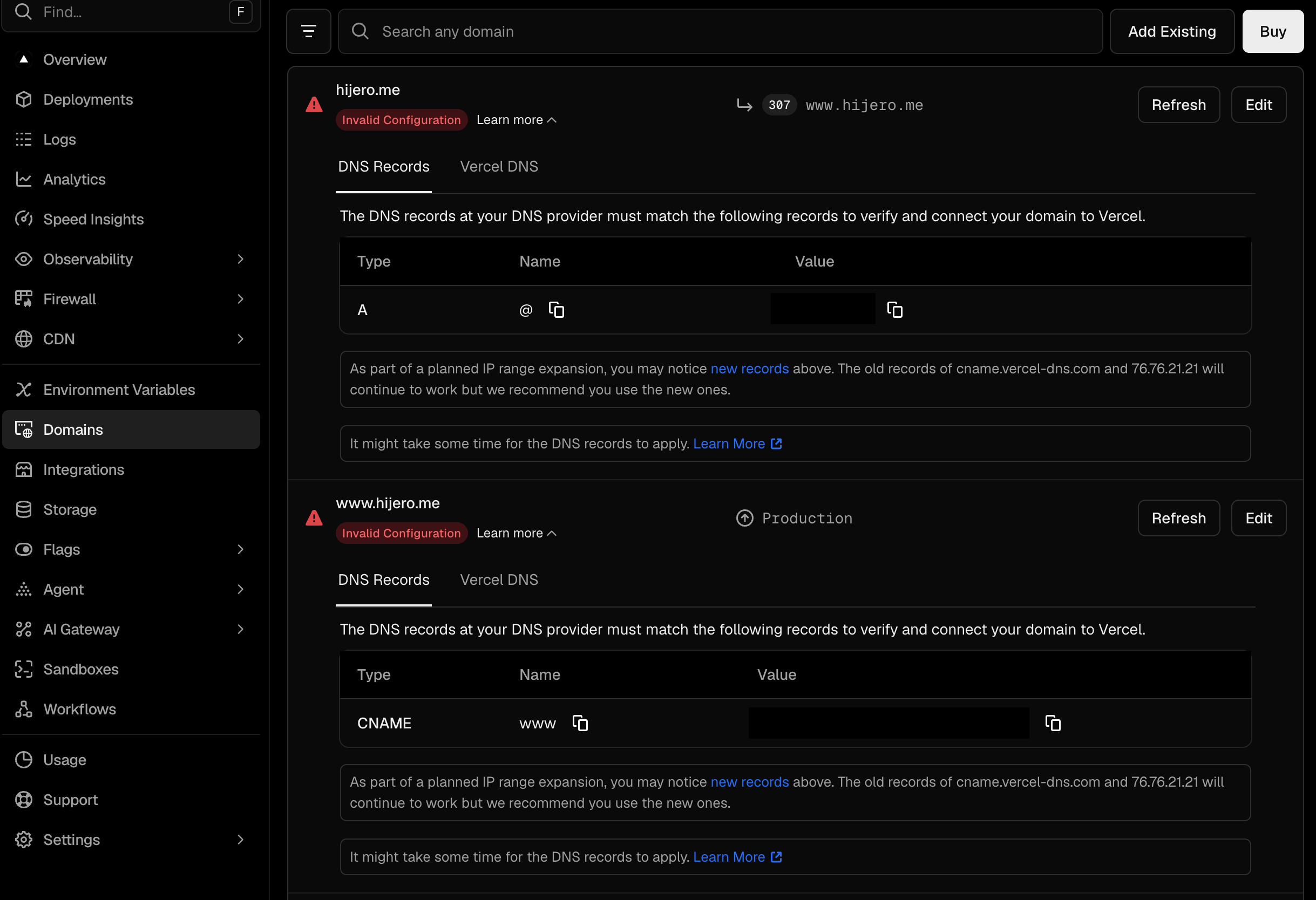
An A record and a www CNAME are required. I went ahead to add them in Cloudflare — and that's when a conflict surfaced.
DNS conflict — the Authorize modal
I'd added the www CNAME in Proxied mode, and Vercel detected the conflict. This modal appeared:
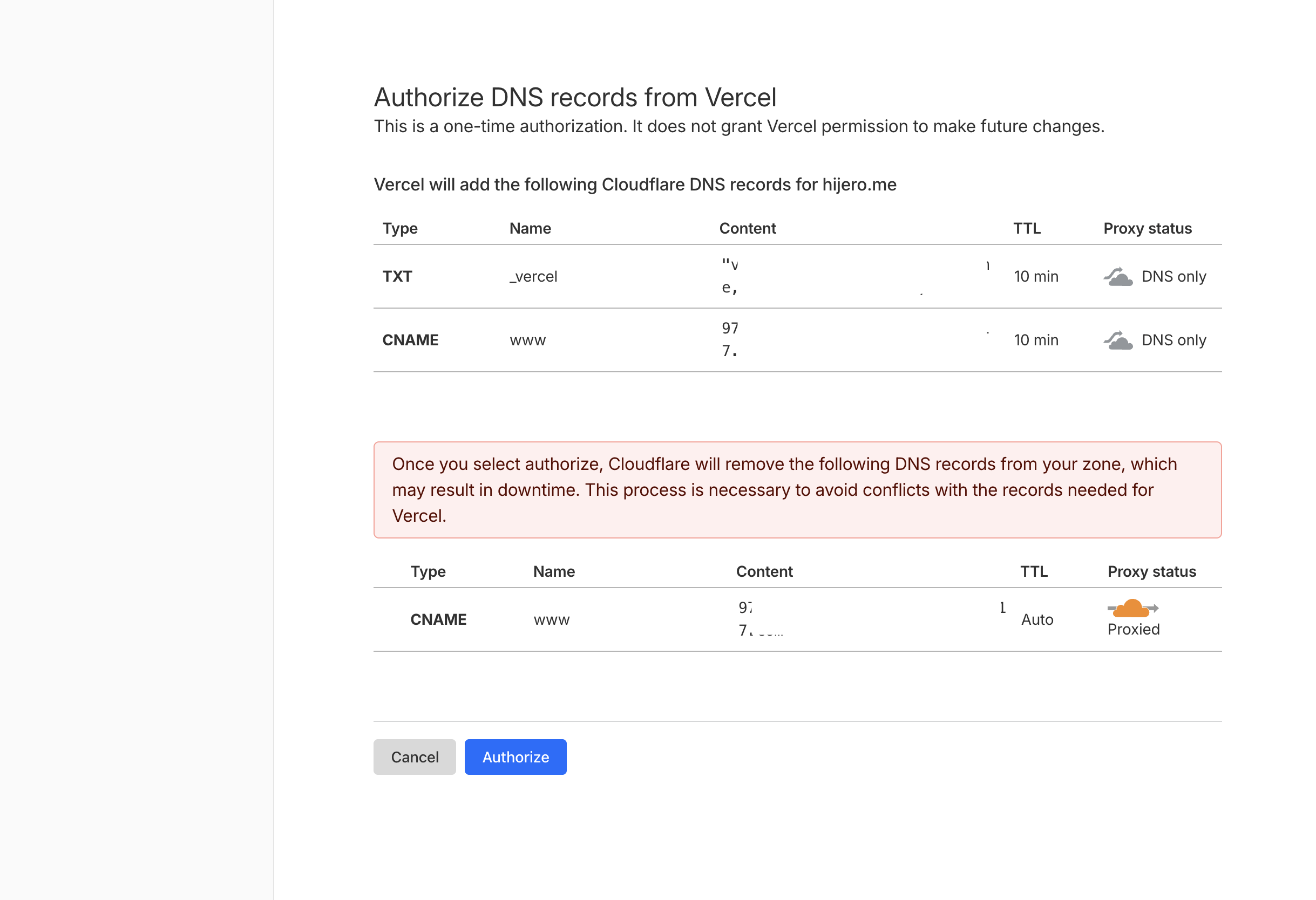
This is a one-time authorization screen asking permission for Vercel to directly modify your Cloudflare DNS. Two things to pay attention to:
The first is the records being added: a _vercel TXT record and a www CNAME will be created.
The second is the record being removed: the www CNAME I added in Proxied mode is flagged for deletion. The reason: leaving it Proxied prevents Vercel from issuing its own SSL certificate directly, causing a conflict.
Heads up: "Authorize" isn't just an agreement — it deletes existing DNS records. If this is a live production domain, review the deletion targets carefully before proceeding.
The _vercel TXT record might look unfamiliar, so here's what it is.
What is the _vercel TXT record?
It's a domain ownership verification token — Vercel's way of proving "this domain belongs to my account" via DNS. Vercel's internal API generates a unique token, which gets registered as a _vercel.hijero.me TXT record. Vercel then queries DNS to confirm the token and grants ownership.
The leading underscore follows the service-specific DNS naming convention defined in RFC 2782/6763. Names starting with _ are reserved for service metadata — they're distinguishable from regular hostnames and keep service-specific data from clashing with actual domains. The same pattern appears in _dmarc, _domainkey (email authentication), and Let's Encrypt's _acme-challenge.
AWS Certificate Manager uses a similar mechanism but opts for a CNAME record (_abc123.example.com → _xyz.acm-validations.aws) instead. Route 53 doesn't need this at all since AWS manages DNS directly.
Vercel chose the TXT record approach because of its multi-tenant architecture. Anyone on Vercel can add any domain to their project — without verification, that opens the door to domain hijacking. The _vercel TXT token closes that gap.
Final DNS configuration
After approving the authorization, Vercel cleans everything up automatically.
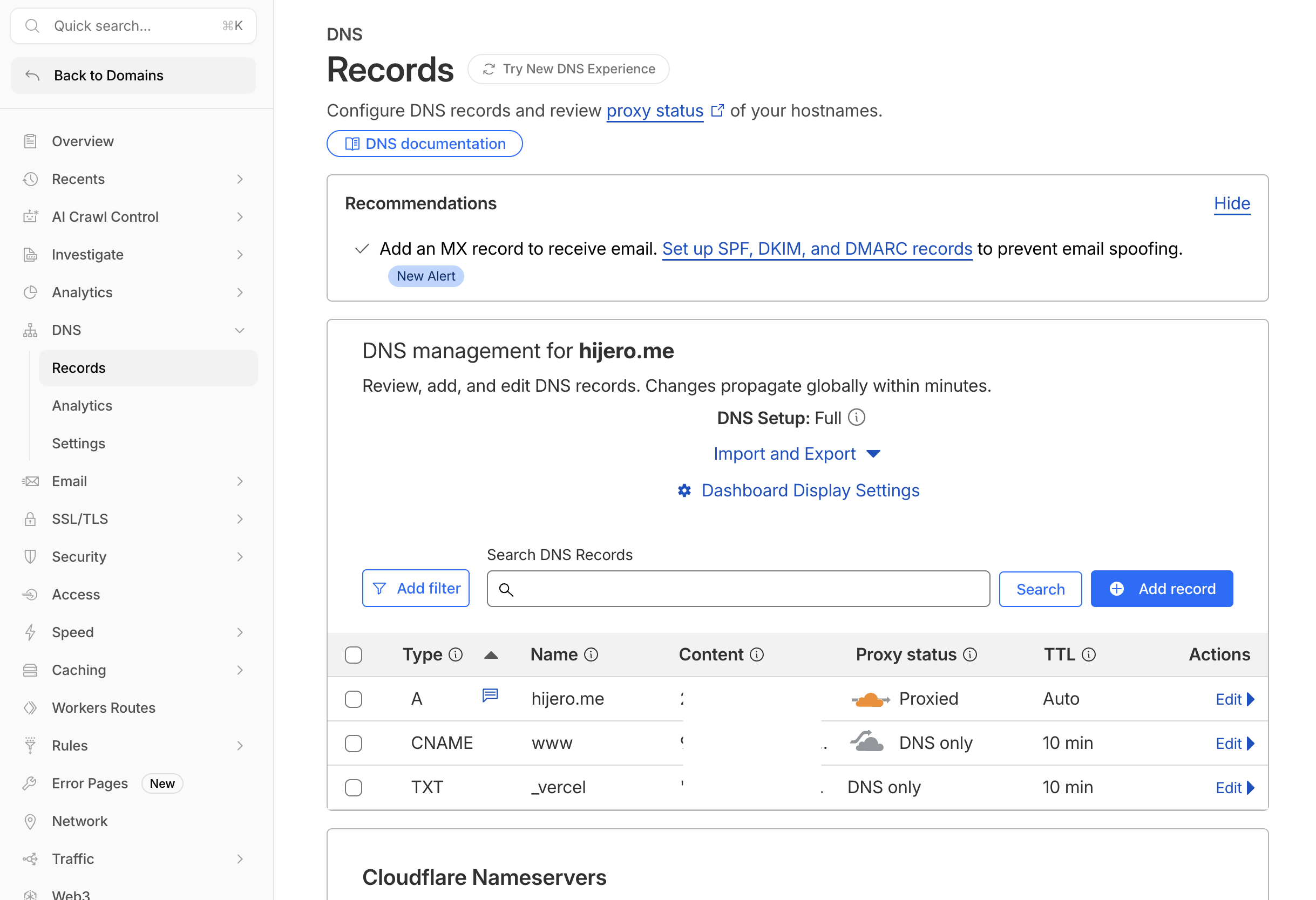
Three records are in place:
- A record:
hijero.me(Proxied, Auto TTL) — main domain routed through Cloudflare CDN - CNAME:
www(DNS only, 10-min TTL) — Proxy disabled so Vercel can issue its SSL certificate directly - TXT:
_vercel(DNS only, 10-min TTL) — domain ownership verification token
The www CNAME and _vercel TXT are set to DNS only (not Proxied) because enabling the Cloudflare proxy on those records would prevent Vercel from provisioning SSL. Only the A record stays Proxied, so the root domain still benefits from Cloudflare CDN while Vercel handles the rest directly.
One More Thing: Check Your Environment Variables
After completing the DNS integration, I headed over to Google Search Console to submit my sitemap — and noticed that the URLs inside it still pointed to xxxx.vercel.app.
The culprit: the NEXT_PUBLIC_SITE_URL environment variable in Vercel was still set to the .vercel.app address from the initial deployment.
In this project, lib/config/site.ts reads NEXT_PUBLIC_SITE_URL and exports it as the SITE_URL constant.
Both sitemap.ts and robots.ts reference that constant directly — so if the value is wrong, every sitemap.xml URL, robots.txt sitemap pointer, canonical tag, and OG URL will point to the wrong address.
Note: Saving an environment variable in the Vercel dashboard does not rebuild your site. You need to trigger a Redeploy explicitly after saving for the change to take effect.
The fix is straightforward:
- Vercel project → Settings → Environment Variables → update
NEXT_PUBLIC_SITE_URLto your custom domain (https://hijero.me) - Trigger a Redeploy → once it completes, open
https://hijero.me/sitemap.xmldirectly to verify the URLs - Google Search Console → Sitemaps → submit your sitemap URL
Once Google successfully processes the sitemap, the Submitted sitemaps panel will show a "Success" status.
Wrap-up
The whole process — from purchase to live DNS — took about 15–20 minutes. DNS propagation can take up to 48 hours in theory, but in my case it seemed to resolve within 5 minutes.
I assumed this would be completely routine, but a couple of things turned out to be worth understanding properly.
First, Proxied vs DNS only directly affects whether Vercel can issue its own SSL certificate. Adding the www CNAME in Proxied mode is what triggered the conflict in the first place. When Cloudflare Proxy is on, traffic terminates at Cloudflare's edge — Vercel never sees it directly, so it can't complete the certificate challenge.
Second, the _vercel TXT record is more interesting than it looks. It's not just a config value — it's an RFC-standard ownership verification mechanism designed to prevent domain hijacking in a multi-tenant platform. The same underscore-prefixed pattern used by _dmarc and _acme-challenge.
And finally, environment variable hygiene: if your app has a NEXT_PUBLIC_SITE_URL or similar constant that feeds your sitemap and SEO metadata, update it to your custom domain immediately after connecting — then redeploy. Miss this step and your sitemap will keep pointing at the wrong address.
That wraps it up. Buying a domain on Cloudflare, wiring it to Vercel, and tidying up the environment variables is a clean end-to-end cycle — and I'm glad to have the personal infrastructure in place for whatever comes next.
Thanks for reading.